Email Marketing

Email Marketing That
Knows Your Donors

BetterUnite email marketing lives inside the fundraising CRM. Build campaigns in a drag-and-drop editor, target audiences across donors, event guests, and volunteers, merge each donor’s giving history into the copy, send from your own domain, and see which emails actually drove donations.

A laptop showing the BetterUnite email newsletter builder with a Back to School campaign, and pink paper planes in flight

Donor emails that send from your own domain,
with every open, click, and reply landing in
one CRM.

G2 Winter 2026 badge: High Performer, Small Business, Donor Management G2 Winter 2026 badge: Best Support, Small Business, Fundraising G2 Winter 2026 badge: Easiest Admin, Donor Management G2 Winter 2026 badge: Easiest To Do Business With, Donor Management G2 Winter 2026 badge: High Performer, Donor Management G2 Best Software 2026 badge: Top 25 Non-Profit Software Products

01Template Library

A campaign built in an afternoon.

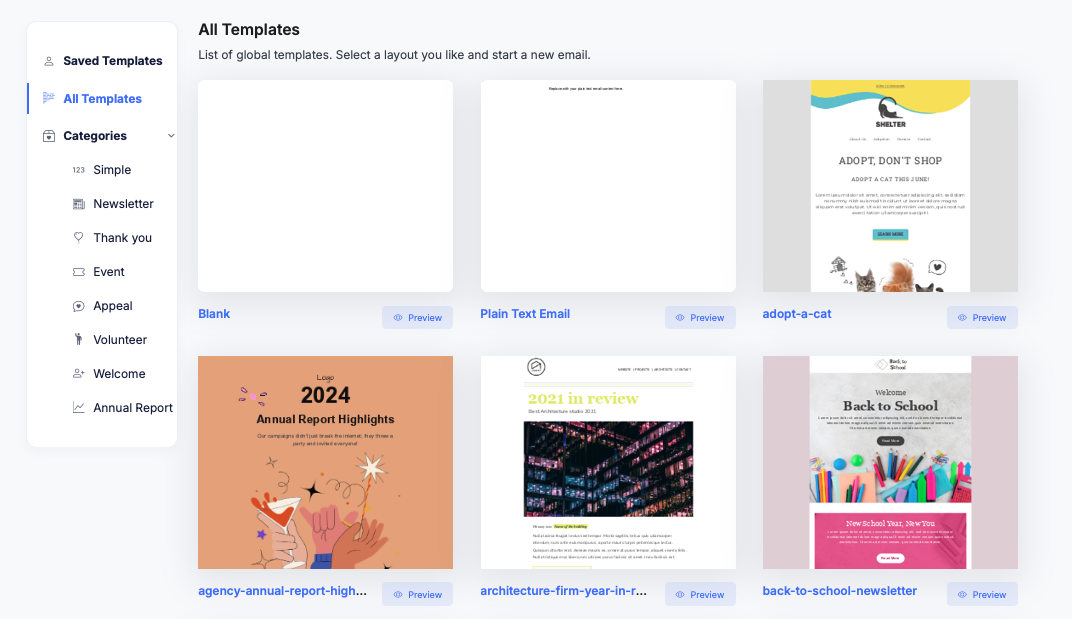
Drag and drop from 12+ content blocks, starting from a template library sorted by Appeal, Thank You, Event, or your own saved rows. Preview desktop and mobile side by side before you send.

  • Drop video, table, HTML, and social blocks onto the canvas from the content block palette
  • Import externally designed HTML emails directly, then save them as reusable org templates for future sends
  • Browse templates for Volunteer and Annual Report campaigns too, and save your own rows and org templates for reuse
Email template library: All Templates with categories Simple, Newsletter, Thank you, Event, Appeal, Volunteer, Welcome and Annual Report, and template cards including Blank, Plain Text Email, adopt-a-cat, annual report highlights, year in review and back-to-school newsletter

02Audience Builder

Audiences a generic email tool cannot build.

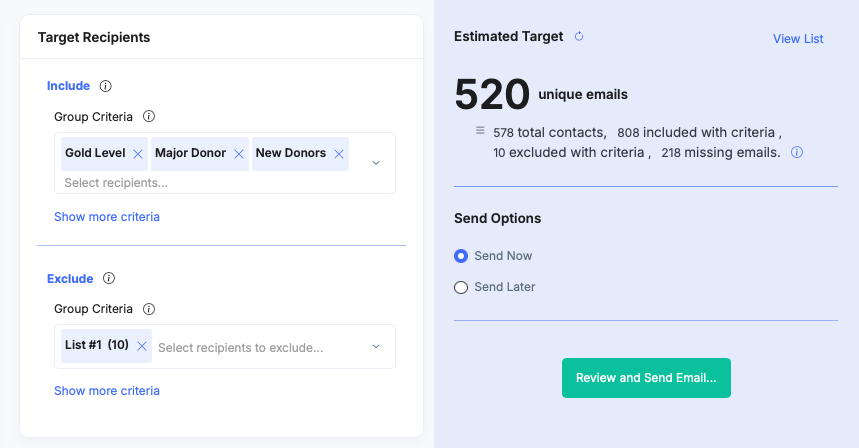
Include and exclude across the platform in one builder: lists, tags, event guests, volunteers, and donors by campaign. Gala attendees who have not given this year is one rule, not an export. Pair it with donor segmentation.

  • Watch a live deduplicated recipient count update as you build, with View List drill-in to see who is included
  • Pull groups, offers, and hand-picked individuals into the same rule set as your lists and tags
  • Target donors, event guests, and volunteers with their giving history attached, because the list is more than a list
Email audience builder: Include criteria Gold Level, Major Donor and New Donors, Exclude List 1, an estimated target of 520 unique emails from 578 contacts, and Send Now or Send Later options with a Review and Send Email button

03Merge Tags

Merge tags that know the last gift.

Fourteen merge tags cover giving history, from first gift date to lifetime total, plus per-recipient Guest Links and personalized statement links. Display conditions show or hide whole rows per recipient.

  • Merge last gift date and amount, plus this year and last year giving totals, straight into the copy
  • Personalize the subject line with merge fields and set the preheader text yourself
  • Show a major-donor paragraph only to contacts who match your condition, such as $1,000+ donors, with zero integration work
Email Details panel with Subject Line, Preview Text and Email Category, and the Insert Merge Field menu open listing First Name, Last Name and custom fields such as Member Since and Affiliation

04Custom Sending Domain

Send from your domain, not ours.

Emails go out from your own domain, with sender name, address, and reply-to configured separately. Schedule in your timezone, test-send to yourself first, and share a public URL for anyone whose client cannot render it.

  • Protect deliverability and brand trust by sending donor and guest-facing emails from your organization's domain rather than BetterUnite's
  • Choose send now or schedule for later, with the send time set in your organization's timezone
  • Reach a contact's secondary or alternate email address as well, once that contact has opted in
Sender settings: Sender Name Better Stage, Sender Email on the organisation domain, and Reply To set to the same as the sender email

05Campaign Analytics

See which email raised the money.

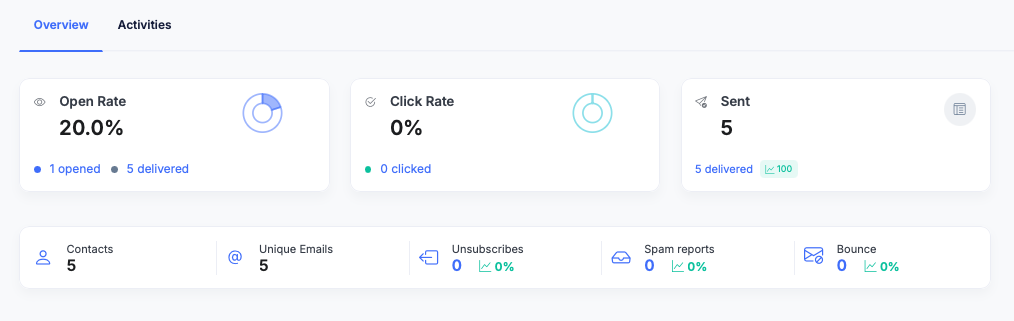
Opens, clicks, bounces, unsubscribes, and spam reports by device, provider, and region. A Top Links report ranks what drove engagement, and donation attribution ties gifts back to the campaign that prompted them.

  • Drill into a recipient-level activity timeline showing each contact's opens, clicks, and actions
  • Break results down by operating system and city as well, beyond the device, provider, and region views
  • Track opens, clicks, and replies back to each contact record, so engagement lives with the giving history
Email campaign analytics Overview: open rate 20 percent with 1 opened of 5 delivered, click rate, sent count, and a strip of contacts, unique emails, unsubscribes, spam reports and bounce, each at zero

06CRM Reply Logging

Replies become relationships.

A donor's reply auto-logs as an activity on their contact record, so staff read the conversation where the giving history already is. The same record feeds automated sequences.

  • Log each reply as an activity with no manual step, since tracking and logging happen automatically
  • Keep the conversation out of a shared inbox, where development staff would otherwise lose track of it
  • Set a separate reply-to address, apart from the sender name and sender email
Contact Activity History showing a sent email, Thank you from Better Stage, logged as completed and outbound, and above it a reply from Sarah Clark on Sep 20 quoting Thank you so much, see you at the gala, tagged inbound, both logged as email activities

07Preference Center

Opt-outs enforce themselves.

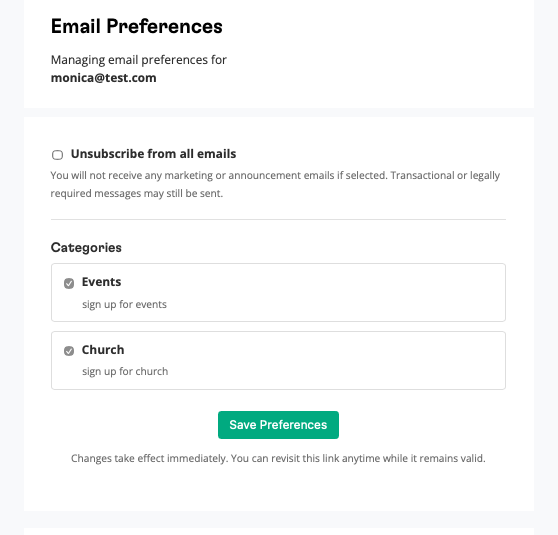
Preference categories let a donor opt out of specific types of email rather than everything. One-click unsubscribe rides on every send, and each opt-out is enforced automatically.

  • Let contacts opt out of specific types of email rather than everything at once
  • Enforce every opt-out automatically on every future send, not just the next one
  • Configure preference categories in one settings screen, shown to contacts as a preference center
Donor-facing Email Preferences page for monica at test dot com: an Unsubscribe from all emails option, then Categories with Events and Church each ticked, and a Save Preferences button

Frequently Asked
Questions

Can I personalize emails with giving history?

Yes. Merge tags include last donation date and amount, first gift date, lifetime total, and totals for this year and last year. There is no integration work involved, because the email tool and the giving data live in the same system.

Can I send different content to major donors in the same email?

Yes. Dynamic display conditions show or hide rows per recipient, so a major-donor paragraph renders only for the contacts who match your condition and everyone else sees the standard version.

How do I target event guests or volunteers, not just donors?

The audience builder includes and excludes across modules: event guests from specific campaigns, volunteers, donors, tags, groups, outreach lists, and hand-picked individuals, with a live deduplicated count as you build. Gala attendees who have not given this year is a single rule. See donor segmentation for saved lists, and event guest emails for the event-side sends.

Can emails send from our own domain?

Yes. Donor and guest facing emails can send from your organization’s domain rather than BetterUnite’s, and sender name, sender email, and reply-to are each configured separately, which protects deliverability and keeps the brand consistent.

What analytics do I get?

Open, click, bounce, unsubscribe, and spam dashboards; breakdowns by device, operating system, mailbox provider, city, and region; a Top Links click report; and a per-recipient activity timeline. Replies are tracked and logged on contact records, and donation attribution ties gifts back to the campaign that drove them.

Can I migrate templates from Mailchimp or Constant Contact?

Yes. Import externally designed HTML emails directly, then save them as reusable org templates so the next campaign starts from your existing design. See the MailChimp migration path for moving lists and history across at the same time.

Get started

Your email tool should
know who gave.

A walkthrough with your own data: your programs, your questions. No pressure, no endless sales cycle.

See pricing first

Request a demo